Behind The Scenes
See exactly what's possible with this technique. This highly viral format merges the real world with cinematic universes. Perfect for creators looking to elevate their storytelling game.
01 The Reference Selfie
Choose a high-quality photo of yourself. This is your "Identity Lock." Ensure your face is clear and the lighting is neutral. You will use this same image for every scene to keep your look consistent.
02 Create the Scenes Nano Banana
Go to Higgsfield.ai, select the Nano Banana Pro model, and upload your reference photo. For Quality select 4K.
Image Prompt
Create a realistic, high-fidelity (8K) image based on the attached reference photo. Maintain the exact facial features, skin tone, bone structure, hairstyle, and expression of the attached person, with no alteration or face swapping. Selfie-mode portrait of the attached man on the left side, taking the picture (same outfit) together with [Actor / Character] from [Movie/TV Show]. The background shows a film set of a famous scene with [Specific Character] and the rest of the actors. The other actors are acting.
03 Create the Transitions Kling
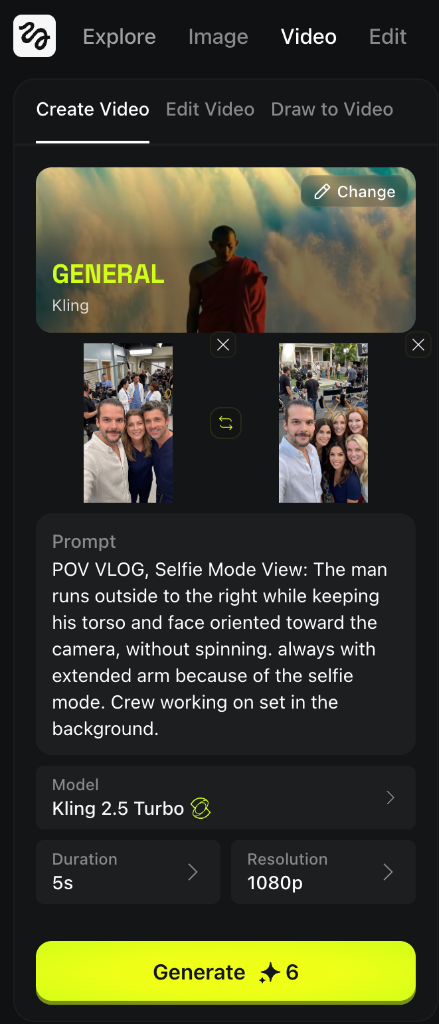
Use the Kling 2.5 Turbo model (Video) to animate the "run" between sets. Use First Frame / Last Frame feature. (5s, 1080p).
Video Prompt
POV VLOG, Selfie Mode View: The man runs to the right while keeping his torso and face oriented toward the camera, without spinning. always with extended arm because of the selfie mode. Crew working on set in the background.
04 Final Cut Pro Editing
Import your generated clips into your editor of choice.
Pro Tip Sound Design is Key
Layer in "Set Ambience" (chatter, equipment moving) and a "Whoosh" effect during the transitions.